QR codes earned their place by being trustworthy: point your camera, get where you meant to go. Scammers noticed. A whole category of fraud now rides on that reflex — it is called quishing, and because a QR code is a link your eye simply cannot read, it is unusually effective. This guide explains exactly how these attacks work, the four patterns you will actually run into, how to spot a malicious code in the two seconds before you tap, and — if you print codes yourself — how to keep your own audience safe.
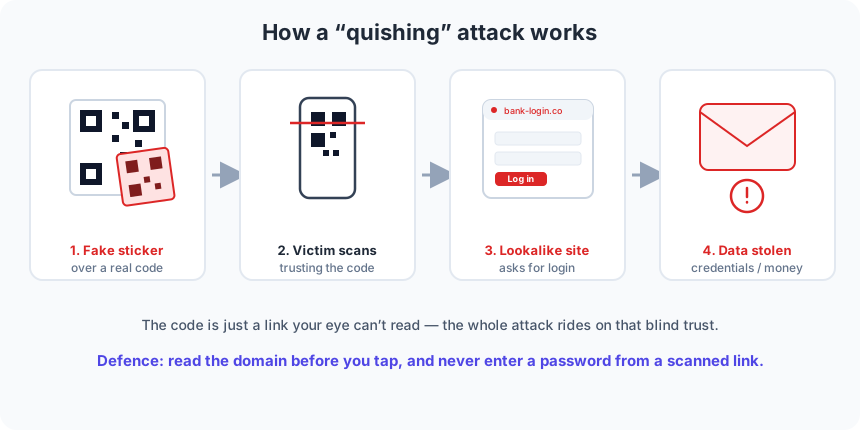
What quishing actually is
Quishing is a blend of “QR” and “phishing.” The mechanics are the same as any phishing attack — lure someone to a fake page, harvest their password or payment details — but the delivery is a QR code instead of a clickable link. That swap matters more than it sounds. A phishing email shows you a URL you can read and judge. A QR code shows you a grid of squares that encodes a URL you cannot read. You are trusting the destination sight unseen, and that blind trust is the entire attack surface.
A QR code is not malware. It cannot install anything by itself or “hack” your phone on contact. It only ever does one thing: hand a string — almost always a web address — to whatever app opens it. Every quishing scam is really a story about where that address points and how convincingly the page there imitates something you trust.
Why QR codes are a phisher’s dream
Several things line up in the attacker’s favour. The destination is invisible until you commit — unlike a link in an email, there is no hover-to-preview on a poster. Codes are almost always scanned on a phone, where the address bar is short, domains get truncated, and a careful look is awkward. They are usually scanned in a hurry and in public — a parking meter, a restaurant table, a conference badge — exactly when your guard is down.
And crucially, a QR code slips past filters built for text. Email security tools scan the words and links in a message, but a QR code arrives as an image, so a malicious link tucked inside it can sail through a corporate spam filter that would have caught the same URL typed in plain text. That single property is why quishing exploded in business email in recent years.
The four patterns you will actually meet
1. A fake sticker over a real code
The most common physical attack, and the simplest: the scammer prints their own QR sticker and presses it neatly over a legitimate one — on a parking meter, a restaurant table tent, a poster, an information board. Everything around it looks official, so you scan without a second thought. Because the overlay hides the genuine code completely, there is nothing visually wrong to notice unless you look for the edge of a sticker.
2. Fake parking and charging payment codes
A specialised version of the sticker trick, aimed straight at your wallet. Codes on parking meters and EV chargers promise a quick “scan to pay,” which makes them the perfect disguise: you already expect to hand over card details, so a lookalike payment page raises no alarm. The money and the card number go to the attacker, and the real parking session was never paid.
3. QR codes inside phishing emails and PDFs
The office variant. An email or attached PDF tells you to “scan to verify your account,” “re-authenticate your mailbox,” or “review the shared document,” with a QR code to scan with your phone. Two tricks are stacked here: the code dodges the email link scanner, and moving you from a monitored work laptop to a personal phone strips away the protections your employer put in place. The page waiting for you is a pixel-perfect copy of a familiar login.
4. Flyers, “prizes,” and street codes
Loose codes with no accountable owner: a flyer under your windscreen wiper, a “you’ve won” card in your letterbox, a sticker on a lamp post offering free Wi-Fi or a discount. There is no institution behind them to complain to, and the payoff dangled in front of you — a prize, free access, a deal — is designed to override caution. Treat any unsolicited code exactly as you would an unsolicited link.
How to spot a malicious QR before you tap
Almost every quishing attempt falls apart under a few seconds of attention. Modern phones show you the destination URL before opening it — that preview is your single most important defence. Run through this quick checklist:
- Read the domain, not the whole link. Look at the part just before the first single slash — that is who really owns the page.
secure-login.bank-verify.cois not your bank, no matter what the rest of the address says. - Distrust shortened links. A
bit.lyor unknown short URL on a payment or login code hides the real destination. Legitimate parking meters and banks rarely need one. - Be suspicious of any code that immediately wants a password, card number, or app install. That is the payload of nearly every scam. A genuine menu or Wi-Fi code asks for none of these.
- Check the physical code for a sticker. Run a fingernail across the edge. A code layered on top of another, slightly misaligned or a different paper finish, is a red flag.
- Ignore codes from unsolicited emails, letters, and flyers. If you did not ask for it, do not scan it.
- When in doubt, type it yourself. Going to your bank or parking app directly, by hand, defeats the attack entirely — you reach the real site instead of the one someone chose for you.
If you print QR codes, protect your audience
Quishing is not only a risk to individuals — it is a risk to your brand when your codes are the ones being impersonated. A few habits make your codes far harder to abuse. Encode a domain you actually control, so a careful person who checks the URL sees your real name and trusts it. Print the destination in plain text beside the code (“Opens example.com/menu”) so people can verify what they are about to scan.
Think hard about redirect-based “dynamic” codes, too. A code that routes through a third-party short domain is convenient, but it also means your audience is trusting a domain you do not own — and if that service is compromised or lapses, every code you printed points wherever the new owner decides. Our guide to static vs. dynamic QR codes walks through the trade-off in detail. Finally, inspect your printed codes periodically for stickers or tampering, especially anything unattended in public.
Where QRStudio fits
QRStudio generates static codes entirely in your browser: the address you type is encoded directly into the pattern, with no third-party redirect in the middle and nothing about the code logged or sent anywhere. What you put in is exactly what a scanner reads out — there is no hidden hop for anyone to hijack. That said, a static code is only as trustworthy as the URL inside it, so the rule still holds: encode a domain you control, and give people the text of the destination so they can check it. The technology is neutral; safety comes from the address you choose and the two seconds a scanner spends reading it.