When you generate a QR code, the very first decision — whether you realise it or not — is whether the code will be static or dynamic. The choice sounds technical but has real consequences for cost, privacy, editability, and even how long the code keeps working. This guide explains the difference clearly, and gives you a simple framework for picking the right type the first time.
The short answer
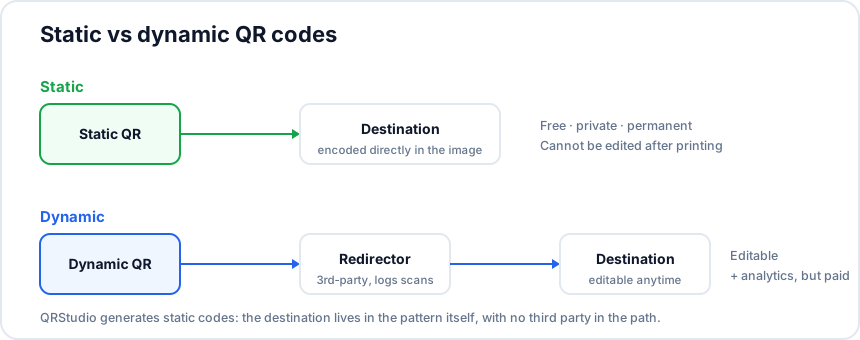
A static QR code encodes the destination — a URL, phone number, Wi‑Fi credential, or text string — directly into the printed pattern. Once the code is generated, the destination is locked in: the only way to change it is to generate a new code.
A dynamic QR code encodes a short redirect URL belonging to a third–party service (something like qrcode-service.com/r/abc123). The service stores the real destination separately, and when the code is scanned the service redirects the user. Because the destination is not in the code itself, you can change it any time without reprinting.
For most people, most of the time, a static code is the right choice. Dynamic codes solve a real problem — editability and per–scan analytics — but they introduce dependencies, recurring costs, and privacy trade–offs that many users do not anticipate. QRStudio generates static codes only, and the rest of this article explains why that is a deliberate choice.
How each type actually works
Static
When you type https://example.com/menu into a static generator, the resulting QR code encodes those exact characters. A scanner reads the pattern, decodes https://example.com/menu, and opens that URL. There is no intermediary, no logging, and no service that needs to remain alive for the code to work. Even if the company that generated the code disappears tomorrow, the printed code keeps functioning as long as example.com/menu is online.
The downside is that the destination is permanent. If you print 5,000 menus pointing to /menu-spring and then change the URL structure on your website, every printed code breaks. The fix is to encode URLs that are unlikely to change, or to encode landing pages on a domain you fully control where you can deploy a server–side redirect of your own.
Dynamic
A dynamic generator gives you a short URL on its own domain, encodes that short URL into the QR pattern, and stores the mapping abc123 → https://example.com/menu on its servers. When someone scans the code, their phone fetches the short URL, the service looks up the mapping, and 302–redirects to the real destination. Edit the mapping in your dashboard and every existing printed code immediately points somewhere new.
In addition to editability, the redirect lets the service log every scan: timestamp, approximate location (from IP), device type, and (sometimes) referring app. That telemetry feeds the analytics dashboards dynamic services market as their main selling point.
Five trade–offs to weigh
1. Cost
Static codes are free forever — you generate the image once, and the cost ends there. Dynamic codes are almost always sold as a recurring subscription (typically €5–€30 per month per active code, or per–tier pricing for larger fleets) because the redirect service has to keep running. Stop paying and the codes stop working.
2. Editability
Dynamic wins clearly here. If you genuinely expect to change destinations — rotating campaign URLs, seasonal menus that change six times a year, restaurant–chain codes that should A/B test landing pages — dynamic is worth paying for. If you just have a fixed Wi‑Fi password or a permanent contact page, static gives you the same flexibility for free, because the destination already on the open web can be edited independently.
3. Analytics
Dynamic services log scans by default; static codes do not. But this is a smaller advantage than it sounds, because any destination URL on a domain you control can be tagged with UTM parameters and tracked in Google Analytics, Plausible, Fathom, or your preferred privacy–respecting analytics tool. A static code pointing to example.com/menu?utm_source=table&utm_medium=qr&utm_campaign=spring2026 gives you the same per–placement attribution as a dynamic code, without the third–party redirect.
4. Privacy and trust
Static codes leak nothing to a third party. The user's phone goes directly to your URL. Dynamic codes route every scan through someone else's servers, which means that company sees the IP, user agent, and scan time of every person who ever scans your code. If the destination is a Wi‑Fi credential, a private invitation, a healthcare leaflet, or anything where the third–party log is itself sensitive, static is the only correct choice.
There is also a trust dimension on the user side. Phones increasingly preview the URL behind a QR code before opening it. If the preview shows qrcode-redirect.example/r/abc123, security–aware scanners will hesitate; if it shows your own clean domain, they will tap through.
5. Long–term durability
Static codes work as long as the destination URL works — under your control. Dynamic codes work as long as the redirect service stays in business and you keep paying. Several QR–code SaaS companies have shut down or changed pricing dramatically, leaving customers with thousands of printed codes that no longer redirect. Treat dynamic codes as a tactical tool with an expiry, not a permanent piece of infrastructure.
A simple decision rule
Use a static QR code when:
- The destination is stable (Wi‑Fi credentials, a permanent contact page, a phone number, an email address).
- You want the printed material to keep working forever, even if you change tools or providers.
- Your destination is on a domain you control, where you can update content or add server–side redirects yourself.
- Privacy matters to you or to your users.
- You are budget–conscious or do not want a recurring subscription.
Use a dynamic QR code when:
- You genuinely expect the destination to change repeatedly after the code is printed, and you do not control a domain where you could deploy your own redirects.
- You need scan analytics that you cannot derive from your own destination–side analytics with UTM parameters.
- You are running short–lived campaigns where the recurring cost is acceptable.
The "static + your own redirect" pattern
If you are comfortable with a small amount of server work, you can capture most of the benefit of dynamic codes without the recurring cost. Encode a static QR code that points to a short path on your own domain — for example, example.com/qr/menu. On your server, route that path with a 301 or 302 redirect to wherever you actually want the user to land.
When the campaign changes, change the redirect rule. The printed QR codes never need to be updated. You get full control of analytics (the request hits your own server first), no third–party trust dependency, and no monthly fees. The downside is the small amount of plumbing required — but if you have a website at all, this is usually a five–minute job in a redirect–rules file.
Generating a static code in QRStudio
QRStudio is a static–code generator by design. Open the tool, paste your URL, customise the colours and corner style if you want, and download the result as PNG, SVG, or JPG. Nothing leaves your browser; there is no account to register, and no recurring subscription waiting in the wings. If your use case truly needs the editability of a dynamic code, point QRStudio at your own redirect URL on your own domain — and keep ownership of the whole stack.