QR code menus arrived overnight in 2020 and never fully left. Some diners love them; plenty quietly hate them. So the honest question for a restaurant owner isn't “are QR menus good or bad?” — it's “when do they help, when do they hurt, and how do I do one that people can actually use?” This guide answers all three, and shows you how to set one up for free without a monthly subscription.
The case for QR menus
The upside is real, and it's mostly about money and flexibility. Once your menu lives online, a QR code that points to it means no reprints — change a price, add a special, mark a dish sold out, and every table is instantly up to date. There is no stack of laminated menus to bin every time the kitchen changes. It is genuinely contactless, it frees up staff who used to hand out and collect menus, and the online version can carry things paper can't: dish photos, full allergen and calorie information, translations, and links to order or pay.
For a small place with a menu that changes often — a daily specials board, a seasonal kitchen, a food truck — that flexibility is worth a lot.
The case against them
The downsides are just as real, and they're mostly about the guest experience. A QR menu quietly excludes anyone whose phone is dead, who is low on data, who left their reading glasses at home, or who simply doesn't own a smartphone — and that last group skews older and is a real slice of many customer bases. Even for the tech-comfortable, there's friction: unlock the phone, open the camera, wait for a page to load, pinch-to-zoom a cramped PDF. It can feel impersonal, it pulls people onto their screens instead of the table, and it fails completely the moment the menu link breaks or the Wi-Fi is flaky.
There's a business cost too: several studies and plenty of anecdote suggest guests browsing a small phone screen order more conservatively than guests holding a full printed menu — they see less, so they order less.
The verdict: hybrid, not either-or
The restaurants that get this right treat the QR menu as an option, not a replacement. Offer the code for the people who prefer it — and keep a stack of clean paper menus for everyone else, no sighing, no “it's all on the QR code.” You keep the flexibility and the cost savings where they matter while never turning a paying guest away at the door of your own menu. Treat the digital version as the always-current master and the printed few as a courtesy.
How to set one up for free
You do not need a paid “QR menu” subscription. Three steps:
- Put your menu online. A simple page on your own website is best; a hosted PDF works too. Use a short, tidy address on a domain you control (e.g.
yourplace.com/menu). - Generate a static QR code that points to that address with QRStudio — free, no sign-up, and the code encodes your link directly.
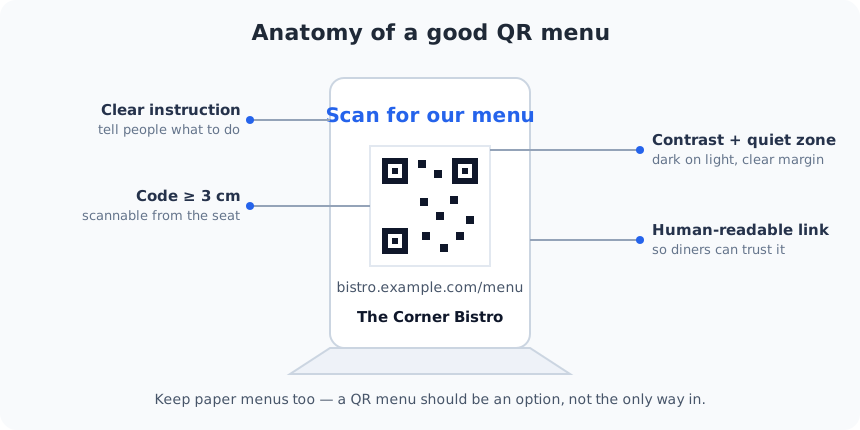
- Print it on a table tent at the right size, with the parts shown in the diagram above.
One decision worth understanding: a static code points straight at your URL, so if you ever change the menu's web address you'll need to reprint. A dynamic code (from a paid service) lets you re-point it later without reprinting, but routes every scan through a third party you don't control. Our guide to static vs. dynamic codes covers the trade-off; for most restaurants a static code to a stable URL is the cheaper, more private choice.
Designing the table tent
A menu code is scanned from a seated position, so the details matter more than for a poster. Give it a clear instruction (“Scan for our menu”) so nobody has to guess. Make the code at least 3–4 cm so it reads from across the table — see our size guide for the maths. Keep strong dark-on-light contrast and a clear quiet-zone margin, and print the human-readable link underneath so guests can see — and trust — where it goes before they scan.
And remember accessibility: a code alone leaves some diners stuck, so a short written note or a spare large-print menu makes the whole thing inclusive. Our accessibility guide goes deeper.
The mistakes that ruin QR menus
- A code too small to scan from a normal seated distance.
- Glossy lamination that throws glare under restaurant lighting.
- A menu hidden behind an app install, a login, or a slow, un-mobile-friendly page.
- A link that eventually 404s — test it every time the menu changes.
- No paper fallback and no written instruction, leaving some guests stranded.
Before the first dinner service, print one table tent at final size and scan it from a seat with two different phones. If it reads instantly and lands on a fast, readable menu, you're done — if it stumbles, the fix is almost always size, contrast, or the page it points to. Our troubleshooting guide covers the rest.